Reliable Failure Alerts for No-Code Automations
Introduction
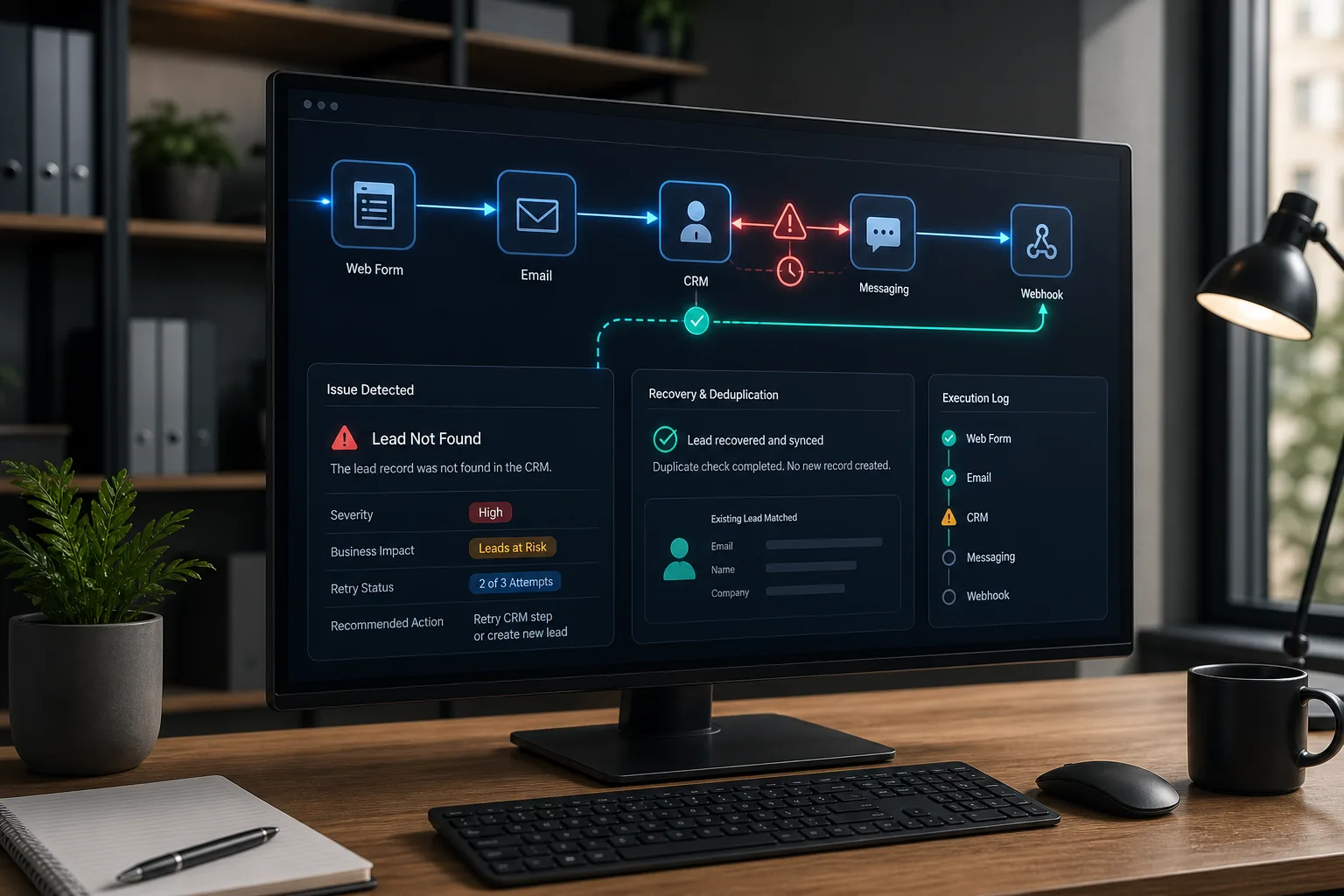
A marketing automation can look healthy while quietly losing leads. A form submission may enter the workflow, yet a timeout prevents the contact from reaching the CRM. A campaign may finish without errors but process no records. A retry may succeed while accidentally creating a duplicate task.
That is why reliable automation requires more than turning on a platform's default error email. Effective failure alerts must answer three questions: What happened? What is the business impact? What should someone do next?
This matters as marketing teams connect systems such as HubSpot, ActiveCampaign, Salesforce Marketing Cloud, Zapier, Make, n8n, Slack, and external webhooks. Each connection creates another place where credentials, data, rate limits, network conditions, or workflow logic can fail.
The goal is not to eliminate every failure. That is unrealistic. The goal is to make failures visible, contain their effects, and give the right person enough context to recover quickly.
Start by Defining What Failure Means
No-code marketing automation platforms typically offer notifications for outright errors. Enabling those notifications is the minimum acceptable starting point, but technical exceptions are only one class of failure.
A workflow can also produce a valid but useless result. Consider an automation that exports an audience every morning. If it completes successfully with zero contacts because a filter changed, the platform may report success even though the campaign is now at risk.
A useful monitoring plan covers three failure categories.
1. Technical failures
These are the clearest cases: an application rejects a request, a network call times out, authentication expires, or a required service cannot be reached. Platforms usually expose an error message and the step that failed.
Technical failures still need interpretation. An HTTP 429 response may indicate temporary rate limiting, while an HTTP 400 response often points to invalid data or a malformed request. Treating both errors with the same retry policy wastes time and may increase the problem.
2. Data failures
The workflow runs, but the record is incomplete, invalid, or incompatible with the destination. Examples include:
- A lead without an email address entering an email sequence
- A country value that does not match the CRM's accepted options
- A date arriving in an unexpected format
- A campaign identifier that no longer exists
- A required consent field being empty
These failures usually require correction, not repeated execution. Retrying the same unchanged record is unlikely to help.
3. Business-logic failures
These are the hardest problems because every technical step may appear successful. The automation might send an alert to the wrong account owner, add customers to the wrong segment, or process far fewer records than expected.
Detecting these problems requires explicit conditions. Teams can flag a run when it processes zero records, exceeds an agreed completion window, produces an unusual volume, or reaches a high-risk branch. The correct thresholds depend on the workflow's normal behavior and business importance; they should not be copied blindly from another team.
Before building notifications, write one sentence describing success. For example: Every valid webinar registration should create or update one CRM contact, record the campaign source, and assign an owner within the expected operating window. That sentence becomes the basis for monitoring.
Design Alerts Around Decisions, Not Error Messages
An alert is useful only if its recipient can decide what to do. Messages such as “Step failed” or “Task encountered an error” create investigation work rather than reducing it.
Every actionable alert should include enough context to identify the run, understand its effect, and find the responsible owner. A practical alert template contains:
- Workflow name and environment: Identify the automation and whether it is operational or being tested.
- Severity: Mark the event as informational, warning, urgent, or another clearly defined level.
- Timestamp and run ID: Provide a reliable reference for the platform's execution history.
- Failing step: Name the specific action, such as “Create contact in CRM.”
- Error category and message: Distinguish timeout, rate limit, authentication, invalid data, and logic exceptions.
- Business impact: State whether leads, campaign sends, attribution, or customer communications are affected.
- Affected record: Include a safe identifier, but avoid exposing unnecessary personal or confidential data.
- Retry status: Say whether a retry is scheduled, succeeded, or exhausted.
- Owner and next action: Identify the responsible person or team alias and suggest the first recovery step.
- Diagnostic reference: Point operators to the platform run history or internal incident record.
A concise Slack or email notification might look like this:
URGENT — Webinar lead sync failed
Workflow: Webinar Registration → CRM
Time: [timestamp]
Run ID: [run identifier]
Failed step: Create or update CRM contact
Category: Invalid data
Impact: 1 registration has not entered lead follow-up
Record: [safe internal identifier]
Retry: Not attempted; correction required
Owner: Marketing Operations
Next action: Review the email and country fields, correct the record, then replay the run
Notice that the technical message is not the headline. The business consequence is. This makes the alert understandable to a brand manager while preserving the details an automation specialist needs.
Match the channel to the severity
Not every event deserves an interruption. Use a simple routing model:
- Informational events belong in logs or periodic summaries.
- Warnings can go to a shared channel or team inbox when the workflow can still recover automatically.
- Urgent failures should notify the accountable team immediately when a time-sensitive campaign or customer journey is blocked.
- Repeated or unresolved failures should escalate to a named backup owner.
Email works well for durable records and lower-urgency review. Slack is useful for visible team coordination. In-platform notifications keep technical details near the workflow but may be missed by people who do not open the automation tool every day.
HubSpot's Slack integration can surface several kinds of CRM and workflow activity. Other tools may need an intermediary such as Zapier to send basic Slack notifications. ActiveCampaign can connect to Webhooks by Zapier, creating a no-code route from workflow events to external notification or recovery endpoints.
The important design choice is not the logo on the channel. It is whether the alert reaches an actively monitored destination with a clear owner.
Separate Retryable Problems From Permanent Ones
Automatic retries are among the most valuable recovery mechanisms, but indiscriminate retries can create duplicate contacts, repeated emails, or unnecessary API traffic.
Start by classifying the failure.
Retry transient failures
Network interruptions, timeouts, temporary server errors, and rate limits may resolve without human intervention. A delayed retry is often appropriate because the destination needs time to recover.
One commonly used technique is exponential backoff: each attempt waits longer than the previous one. A practitioner-reported pattern for transient errors uses waits of 1, 2, 4, and 8 seconds, with no more than three retries before fallback or escalation. This is an example rather than a universal specification. The supported delay, retry count, and handling of particular response codes must be checked against authoritative documentation for each platform.
Alerts should generally describe the recovery state rather than alarming the team on the first recoverable timeout. For example:
- Record the first transient failure.
- Retry according to the approved policy.
- Send a warning if retries are underway and the delay affects the business.
- Send an urgent alert if attempts are exhausted or the backlog grows beyond the team's threshold.
- Send a recovery notice when service resumes, if stakeholders need closure.
Do not retry unchanged permanent failures
Invalid data, missing required fields, revoked permissions, and deleted destination objects usually need intervention. Repeating the same request without changing anything is unlikely to succeed.
These records should move into a holding area instead. Software engineers often call this a dead-letter queue: a place where failed items remain available for inspection and later replay. A no-code equivalent can be a dedicated table, spreadsheet, database view, CRM list, or error-management workflow.
Each held record should preserve the original record identifier, failure reason, timestamp, workflow version or relevant configuration, retry history, and resolution status. Do not use the holding area as a dumping ground. Assign an owner and review schedule so recoverable leads do not disappear into another silent backlog.
Make retries safe with idempotency
Idempotency means that repeating an operation produces the intended final state without duplicating its effect. In marketing operations, this often means updating a contact by a stable identifier instead of blindly creating a new contact on every attempt.
Possible safeguards include:
- Use an email address, CRM ID, order ID, or event ID as a deduplication key.
- Prefer “find or create” and “upsert” operations when the platform supports them.
- Store a source event ID before triggering downstream actions.
- Check whether a campaign member, task, or transaction already exists.
- Avoid automatically retrying irreversible actions such as sending a message unless duplicate prevention is reliable.
A retry policy without idempotency is not complete recovery design. It merely repeats work and hopes the second result is cleaner than the first.
Build Monitoring Into the Workflow
Reliable alerts are easier to maintain when monitoring is designed alongside the automation rather than added after launch.
Isolate risky steps
External API calls, data transformations, audience imports, message sends, and CRM writes deserve separate error paths. Low-code platforms may express this through error handlers, conditional branches, fallback routes, or try/catch-style logic.
Instead of allowing one failed enrichment request to terminate the whole workflow, decide whether the record can continue with a default value, wait for later processing, or move into the holding area. The correct answer depends on the consequence. Optional enrichment can often fail safely; consent validation should not be bypassed merely to keep a workflow moving.
Monitor outcomes as well as executions
Track a small set of operational signals for each important automation:
- Number of records received, completed, skipped, and failed
- Time of the last successful run
- Age of the oldest unresolved record
- Number of retries attempted
- Difference between source and destination record counts
- Whether an expected scheduled run occurred
Salesforce Marketing Cloud illustrates why monitoring layers matter. Account-level notifications and per-automation failure alerts cover different scopes. For a critical automation, the per-automation notification should be configured and supplemented with context such as the failing step, affected record count, and last successful run.
Test the failure path deliberately
A workflow is not fully tested because the happy path succeeds. Before launch, use safe test records to trigger missing fields, expired or invalid test credentials, unreachable endpoints, duplicate events, and destination rejection.
Confirm that the workflow stops or continues as intended, the alert reaches the correct channel, sensitive information is not exposed, and the failed record can be replayed safely. Also test alert recovery. An incident that resolves automatically should not remain visually “open” forever.
Establish a lightweight response process
Even a well-written alert fails if everyone assumes somebody else will handle it. Assign a primary owner and a backup for each business-critical automation.
The response process can remain simple:
- Acknowledge the alert.
- Confirm the business impact and affected records.
- Pause risky downstream actions if necessary.
- Correct the underlying data, credentials, configuration, or service issue.
- Replay held records using duplicate-safe logic.
- Verify the destination outcome rather than trusting a success notification alone.
- Document recurring causes and improve the workflow.
Periodically review alert history. If the same warning is routinely ignored, either the threshold is wrong or the condition does not require an alert. If teams repeatedly discover failures through customer complaints or campaign reports, monitoring is missing an important outcome.
Quick Checklist
- Define successful business outcomes for every important automation.
- Enable the platform's native failure notifications and route them to a monitored destination.
- Add alerts for silent failures such as zero records, missed runs, or incomplete outputs.
- Include workflow, run, error, impact, retry, owner, and next-action details in every alert.
- Retry only failures classified as transient, using product-supported policies.
- Make retried actions idempotent so they cannot create harmful duplicates.
- Preserve unrecoverable records in an owned holding area for correction and replay.
- Test failure, escalation, replay, and recovery paths before relying on the workflow.
Frequently Asked Questions
Should every failed workflow send an immediate Slack alert?
No. Immediate alerts should be reserved for events that require prompt attention or threaten a meaningful business outcome. Recoverable transient errors can often be logged and retried first, while persistent failures, exhausted retries, or blocked customer journeys deserve escalation.
Can a spreadsheet act as a dead-letter queue?
For a modest workflow, a controlled spreadsheet or no-code table can serve as a practical holding area for failed records. It needs clear ownership, restricted access, failure details, resolution status, and a safe replay process. As volume or sensitivity increases, a more controlled data store may be appropriate.
How many times should an automation retry?
There is no universal number. The decision depends on the error type, destination limits, urgency, risk of duplicates, and the platform's supported behavior. Use delayed retries for genuinely transient conditions, cap the attempts, and consult authoritative product documentation rather than treating community examples as fixed specifications.
What is the most important field in a failure alert?
Business impact is often the most neglected. A run ID helps an operator investigate, but “12 campaign registrations have not entered follow-up” tells the team why the incident matters. The strongest alert includes both operational evidence and business context.
Who should own marketing automation alerts?
Ownership should follow the ability to act. Marketing operations may own CRM and campaign workflows, while IT or a systems team may handle authentication and integration infrastructure. Critical automations need a named primary owner, a backup, and an agreed escalation destination rather than a vague group of interested people.
Final Thoughts
In practice, the best failure-alert system is not the one producing the most notifications. It is the one that distinguishes temporary friction from genuine business interruption and makes the next decision obvious.
The first editorial judgment is that business context matters more than technical verbosity. An error code without affected-record counts, campaign consequences, or ownership is evidence, not an actionable alert.
Second, recovery design should come before aggressive retrying. Exponential backoff can handle temporary faults, but idempotency and a durable holding area are what make retries safe. Without them, automation can turn a brief outage into duplicate or inconsistent customer activity.
Finally, no-code does not mean no operations discipline. As marketing workflows become responsible for lead routing, attribution, audience movement, and customer communication, they deserve the same habits used in dependable software systems: observable outcomes, controlled recovery, clear accountability, and regular testing. The tools may simplify implementation, but the responsibility for reliable behavior still belongs to the team designing the workflow.
Sources
- Error Handling in Low-Code Workflows: Best Practices - Latenode Blog
- Monitoring & Alerting for Automations — No-Code Automation | CoddyKit
- monitoring & identifying failures in no‑code workflows
- 21 Best Email Tools With Slack Integration (2026) | Sequenzy
- ActiveCampaign Webhooks by Zapier Integration - Quick Connect
- How HubSpot Zapier Integration Streamlines Business Operations
- Understanding Dead Letter Queue (DLQ) in System Design - LinkedIn
- Data Pipeline Design Patterns: Idempotency, DLQ, CDC and 5 More (2026) | dataskew.io Blog
- Design for failure by using Dead Letter Queues (DLQ)
- Error Handling & Retry Logic for B2B Workflows (Make, n8n, Zapier)
- What patterns do you use for AI agent error recovery? · anthropics/anthropic-sdk-python · Discussion #1341 · GitHub
- Transient error and retry policy for Service Bus triggered Azure Function - Microsoft Q&A
Ready to Get Started?
Explore production-ready 3D models for your next project. Browse the 3D model catalog to download assets you can use right away.
Turn this workflow into real deliverables
Browse production-ready 3D models for your next project, then step into 3d modeling if you need a custom build.